
A CRO audit is a structured review of your website, analytics and user behavior that finds where visitors drop out of the funnel and what to fix first. It works for any site with a conversion goal: an online store, a lead generation site, a SaaS signup flow.
This guide is the process behind our Hitlist CRO audit, written so you can run each step yourself.
Last reviewed 2026-10-06 by Devon Cox, Founder and President, ConversionTeam (18+ years in CRO). ConversionTeam has run 8,000+ A/B tests, with a 61.1% program win rate.
TL;DR: CRO audits in one minute
- A CRO audit finds where visitors leave your funnel and why, then ranks the fixes by impact, effort and strength of evidence.
- Nine steps: goals, funnel map, analytics check, behavior data, user testing, page review, forms and checkout, mobile and speed, and a prioritized roadmap.
- Start with an analytics check and 30 to 90 days of clean data, then fix what’s broken and A/B test the top-ranked findings one at a time.
Bottom Line: audit before you test, fix the defects outright, and test everything else in order of expected impact.
Table of contents
- CRO audits by the numbers
- What is a CRO audit?
- How is a CRO audit different from a UX audit or an SEO audit?
- When should you run a CRO audit?
- What do you need before you start a CRO audit?
- How do you run a CRO audit? The 9 steps
- What should a CRO audit report include?
- How does a CRO audit differ by business model?
- What are the most common CRO audit mistakes?
- Which tools do you need for a CRO audit?
- What does a professional CRO audit include, and what does it cost?
- Is a CRO audit a one-time project?
- FAQ
- Related reading
CRO audits by the numbers
What sits behind this process, from ConversionTeam’s own work as of 2026:
| Measure | Value |
|---|---|
| A/B tests ConversionTeam has run | 8,000+ |
| Program-level A/B test win rate | 61.1% |
| Tests that win outright | About half |
| Tests that reach statistical significance | About 1 in 5 |
| Length of a Hitlist audit report | 60-90 pages |
| Free Quick Wins audit | 20+ specific optimizations |
| Typical cost of a professional CRO audit | $3,500 to $10,000 |
| Ecommerce benchmark to compare against | 3.9% median site-level conversion rate (456 tests) |
| Desktop vs mobile, same ecommerce test | Desktop higher in 72% of tests |
What is a CRO audit?
A CRO audit reviews your site, analytics and user behavior to find where visitors drop out of the funnel and what to fix first.
It also goes by conversion audit and conversion rate optimization audit. All three mean the same work. CRO stands for conversion rate optimization: raising the share of visitors who complete the action your site exists for.
Conversion rate is conversions divided by visitors, times 100. A site with 30 demo requests from 1,500 visitors converts at 2%. Pick one definition of a visitor (sessions or users) and keep it for the whole audit.
Every site has one main conversion and several smaller steps toward it:
- Ecommerce: the macro conversion is a purchase. Micro conversions: add to cart, checkout start, email signup.
- Lead generation: a qualified lead. Micro conversions: form start, pricing page view, phone click.
- SaaS: an activated trial or paid signup. Micro conversions: trial start, pricing page view, demo request.
The audit diagnoses. The output is a ranked list of problems, each tied to the evidence behind it.
How is a CRO audit different from a UX audit or an SEO audit?
A CRO audit asks why visitors don’t convert. A UX audit checks how easy the site is to use. An SEO audit checks findability.
| Audit | Question it answers | Output |
|---|---|---|
| CRO audit | Where and why do visitors fail to convert? | A ranked roadmap of fixes and A/B tests, built from analytics, recordings, polls and user tests |
| UX audit | Is the site easy to use? | Usability issues by severity |
| SEO audit | Can search engines find, crawl and rank the site? | Technical and content fixes for search |
The three overlap. A CRO audit borrows usability checks from UX, and it often flags a page that SEO sends traffic to but that never converts. What sets it apart is the yardstick: every finding is judged by its effect on conversions and revenue.
When should you run a CRO audit?
Before you start A/B testing, after a redesign or replatform, after a conversion drop, before peak season, and whenever your test backlog runs dry.
- Before a testing program starts: the audit fills the first quarter of tests with evidence-backed ideas.
- After a redesign or a platform migration: new templates bring new friction, and tracking often breaks in the move.
- After a drop in conversion rate that a traffic change doesn’t explain.
- Well ahead of your peak season, so fixes ship before the traffic arrives.
- When the testing backlog runs out or tests keep losing.
After that, refresh the audit once the main findings are worked through or the data is about a quarter old. Traffic mix shifts, competitors change, and your own releases add friction.
What do you need before you start a CRO audit?
Access to your analytics, tag manager, heatmaps and testing tool, 30 to 90 days of clean data, one written goal, and enough traffic.
- Access: Google Analytics 4 (or your analytics tool), Google Tag Manager, a heatmap and recording tool, your A/B testing tool, and the CMS or theme.
- A data window: 30 to 90 days with no tracking changes, so the funnel you read is the funnel you have.
- A written goal: one sentence, scoped to a page group and a metric. Step 1 covers it.
- Enough traffic to test: if a page can’t reach a test’s sample size in about four weeks, lean harder on user testing and polls, fix clear defects directly, and test bigger changes instead of small ones.
The 9-step CRO audit at a glance
| Step | The question it answers | Primary tools | Output |
|---|---|---|---|
| 1. Goals and KPIs | What does “converting better” mean here? | Spreadsheet, stakeholder input | Goal statement and KPI baseline |
| 2. Funnel and segments | Where do visitors drop off, and which ones? | GA4 funnel exploration | Drop-off table by step and segment |
| 3. Analytics check | Can we trust the data? | GA4, Tag Manager | Fixed tracking and clean events |
| 4. Behavior data | What do visitors do on the leaking pages? | Heatmaps, recordings, polls | Behavior evidence per page |
| 5. User testing and competitors | Why do they do it? | User tests, competitor sites | Task failures and better patterns |
| 6. Page review | Is each page clear and convincing? | Five-second test, review questions | Page-level findings |
| 7. Forms, signup and checkout | Where does the last step fail? | Funnel data, recordings | Friction list at the money step |
| 8. Mobile and speed | Does it hold up on a phone? | Device reports, PageSpeed Insights | Mobile and speed findings |
| 9. Roadmap | What do we fix first, and how do we prove it? | Impact, effort and evidence scoring | Prioritized, testable backlog |
How do you run a CRO audit? The 9 steps
Work the steps in order: goals, funnel, analytics, behavior data, user testing, page review, forms and checkout, mobile and speed, then the roadmap.
The order matters. You check the data before you trust it, watch behavior before you form opinions, and gather evidence before you rank anything.
Step 1: Set goals and KPIs
Decide what conversion means for this site before you open a report. A store counts completed purchases and revenue per visitor. A lead generation site counts qualified leads. A SaaS product counts trials that activate.
Write a one-sentence goal for the audit, scoped to a page group and a metric:
- Store: “Find why product pages convert under 1% for paid social traffic.”
- Lead generation: “Find why paid search visitors start the quote form but don’t submit it.”
- SaaS: “Find why pricing page visitors don’t start a trial.”
Then record the baseline: conversion rate by device and traffic source, plus order value or lead quality. Every finding later gets judged against these numbers.
Step 2: Map the funnel and segment the traffic
List the steps from landing to conversion and measure the drop at each one in GA4’s funnel exploration. For a store that’s category, product, cart, checkout, purchase. For lead generation it’s landing page, form start, submission. For SaaS it’s pricing page, signup, activation.
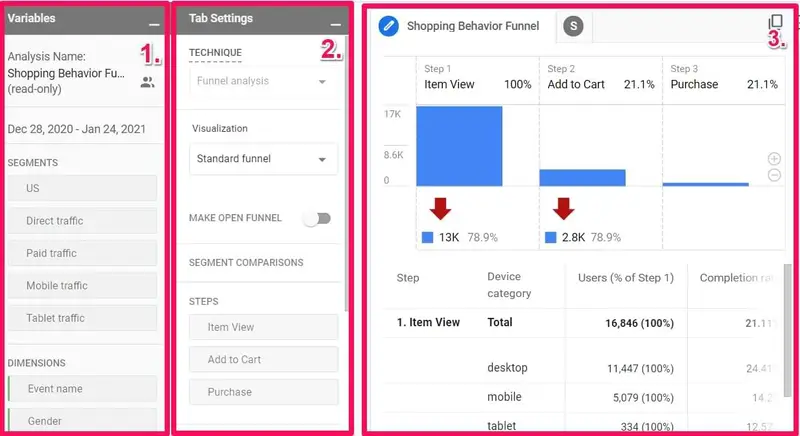
Then split each step by segment:
- Traffic source: channels convert differently. In our ecommerce data, email traffic converted at 6.0% and organic search at 2.4%.
- Device: desktop converted higher than mobile in 72% of our paired ecommerce tests.
- New vs returning visitors:
You’re looking for the step where the drop is out of line with your other steps and with a comparable benchmark. Focus the rest of the audit on that step.
Step 3: Check the analytics before you trust them
Broken tracking produces confident, wrong conclusions. Before you read the data, check it:
- Every conversion is marked as a key event in GA4, and it fires when you complete the action yourself.
- Your own team’s visits are filtered out as internal traffic.
- The same page isn’t reported under many URLs (query strings, trailing slashes, uppercase).
- No duplicate or badly formed events, and no missing funnel steps.
- Site search tracking is on.
Then split conversion by browser. A rate that collapses on one browser is a bug, and bugs get fixed without a test. They’re cheap, certain wins.
Step 4: Collect behavior data
Analytics shows where visitors leave. Behavior data shows what they were doing when they left. Run three collectors on the pages the funnel flagged, for one to two weeks:
- Heatmaps (click and scroll) show whether visitors see and use the elements that drive conversion.
- Session recordings show hesitation, rage clicks, back-and-forth loops and form struggles.
- Polls ask what no tool can measure. Ask one question at the right moment:
- After a purchase or signup: “What’s the one thing that almost stopped you from purchasing today?”
- On a lead form page: “What almost stopped you from getting in touch?”
- On a pricing page: “What do you still need to know to decide?”
- On exit from a listing page: “What were you looking for that you couldn’t find?”
Log what you find per page in a spreadsheet: the page, the issue, the evidence, and how many sessions show it.
Step 5: Run user testing and review competitors
Behavior data shows what visitors do. User testing explains why. Give five to eight people a realistic scenario on your site and watch where they struggle:
- Store: “Find and buy a gift under $100 for a friend who likes hiking.”
- SaaS: “Find out whether the mid-tier plan includes single sign-on, then start a trial.”
- Lead generation: “Request a quote for a 2,000 square foot office.”
Then give the same people the same scenario on a competitor’s site. Testers describe the friction on your site much more clearly once they’ve felt a smoother path somewhere else.
Finish with a short competitive review: the equivalent page on three competitors, side by side. Note anything they explain better, show sooner or ask for less.
Step 6: Review every main page, starting with the message
Review each template in two passes.
Start with the message. Run a five-second test: show the page for five seconds, then ask what the company does and what the visitor should do next. If people can’t answer, the page has a message problem, and no button change will fix it.
Then review the page itself. Ask the same questions on every template, and record pass, fail or unsure for each:
- Is the value proposition specific to this audience?
- Does the page answer the visitor’s main question above the fold?
- Is there one obvious next step, and does it look clickable?
- Is the social proof specific (names, numbers, outcomes) and near the decision point?
- Are the main objections answered: price, shipping, contract terms, security, what happens next?
- Is anything competing with the primary action?
- Does it break a basic usability rule? Nielsen Norman Group’s 10 usability heuristics are a solid reference.
For stores, our 62-point ecommerce CRO checklist is the page-by-page version of this step.
Step 7: Audit forms, signup and checkout
The last step before the conversion gets its own pass, because small friction there is expensive. What to check depends on the business:
- Lead forms: field count that matches the offer, errors flagged as people type, clear error messages, and a confirmation that says what happens next and when.
- SaaS signup: how many steps come before the product shows value, whether you ask for a card up front, and single sign-on options.
- Ecommerce checkout: guest checkout, the full cost shown before the final step, trust cues at payment, and payment options your buyers use. In Baymard Institute’s 2026 survey, 40% of US shoppers who abandoned a checkout blamed extra costs that were too high.
Watch ten recordings of real attempts at this step. Count how many people struggle at the same field. That count is your evidence score for the finding.
Step 8: Audit mobile and page speed
Treat mobile as its own audit. Re-run the funnel comparison by device, then repeat the page review on a real mid-range phone:
- Can a thumb reach the main call to action?
- Do sticky bars or chat widgets cover content or buttons?
- Do form fields open the right keyboard (numbers for phone, email for email)?
- Do image galleries swipe, and do tables or menus break?
Don’t judge mobile against desktop. Desktop converted higher in 72% of our paired ecommerce tests, by a median 1.52x, because people research on phones and often buy on a laptop. Judge mobile against its own last quarter, and make sure a mobile visitor can easily save an item or leave an email.
Check speed with field data from real visitors in PageSpeed Insights. Google’s Core Web Vitals set the bar: the main content loads within 2.5 seconds (LCP), the page responds to a tap within 200 milliseconds (INP), and layout shift stays at 0.1 or less (CLS).
Step 9: Turn findings into a prioritized, testable roadmap
The audit ends as a ranked backlog. Sort every finding into one of two buckets first:
- Fix now: broken tracking, dead buttons, browser bugs, errors. These need no test.
- Test: everything else.
Then score the test bucket. We use a framework we call SCORE: impact (how much traffic it touches and how bad the problem is), effort, and strength of evidence. PIE (potential, importance, ease) and ICE (impact, confidence, ease) do the same job. An example:
| Finding | Impact / evidence / ease | Score |
|---|---|---|
| Quote form asks for 11 fields | 5 / 5 / 4 | 14 |
| No reviews on product pages | 4 / 3 / 3 | 10 |
| Homepage headline is vague | 3 / 2 / 5 | 10 |
Evidence counts as much as impact. A problem that shows up in the analytics, the recordings and the poll answers outranks a hunch about the homepage.
Write each test as a hypothesis: because we saw [evidence], we believe [change] will raise [metric] on [page]. Here is one from a real audit. The audit of a cruise booking site found strong TrustPilot ratings that weren’t visible anywhere in the booking flow. We believed showing them on the itinerary pages would lift bookings. The test lifted conversion rate 35.4% and revenue 41.2% at 99% confidence.
Then run the tests, highest score first. Calculate each test’s sample size before launch (Evan Miller’s sample size calculator is free), run whole weeks, and don’t stop the first time the tool shows significance. Expect losses: about half of tests win outright, and our program-level win rate is 61.1%.
CRO audit process checklist
Use this to check that the audit covered every step. It’s a process list; for the page elements a store should have, use the 62-point ecommerce checklist.
- One written goal and a baseline by device and traffic source.
- Funnel steps measured, with the drop at each step.
- Funnel split by traffic source, device, and new vs returning visitors.
- Every conversion fires as a key event; internal traffic filtered out.
- URL duplicates, broken events and site search tracking checked.
- Conversion rate checked by browser.
- Heatmaps and recordings on every flagged page, one to two weeks of data.
- At least one poll running on a high-intent page.
- Five to eight user tests, on your site and a competitor’s.
- Three competitors’ equivalent pages reviewed.
- Five-second test on each main template.
- Review questions answered for every main template.
- Forms, signup or checkout reviewed, with ten recordings counted.
- Mobile reviewed on a real phone; Core Web Vitals checked.
- Every finding sorted into fix now or test, scored, and written as a hypothesis.
What should a CRO audit report include?
Every finding with its evidence, a priority score, a hypothesis, whether to fix or test it, and an owner, grouped by funnel stage and page.
A report people act on has:
- A one-page summary: the top ten findings and the expected impact of each.
- Findings grouped by funnel stage and page, each with screenshots or recording clips as evidence.
- A score for each finding and the reason behind it.
- A hypothesis for every test, and a plain instruction for every fix.
- An owner and a timeframe for each item.
- The tracking fixes the analytics check found.
Our Hitlist report runs 60-90 pages. Each finding carries its evidence, since a finding without evidence gets argued about instead of fixed.
How does a CRO audit differ by business model?
The nine steps hold for every site. The emphasis shifts by model: stores, lead generation, SaaS and publishers each lean on different steps.
- Ecommerce: funnel = category, product, cart, checkout. Heaviest steps: 6, 7 and 8. Watch product page persuasion, shipping cost disclosure and cart recovery.
- Lead generation: funnel = landing page, form start, submission, qualified lead. Heaviest steps: 1 (defining a qualified lead), 6 and 7. Watch form length and the match between the ad and the landing page.
- SaaS and subscription: funnel = landing page, trial or signup, activation. Heaviest steps: 1, 2 and 5. Watch how well visitors understand the pricing page and how much friction the signup has.
- Content and publishers: the conversion is a subscription or a signup. The funnel map (step 2) and the mobile review (step 8) matter most.
What are the most common CRO audit mistakes?
Trusting broken data, auditing on opinion, reviewing the homepage by default, shipping findings without testing, and letting the roadmap go stale.
- Skipping the analytics check: A funnel built on broken events points at the wrong page.
- Opinions instead of evidence: “I don’t like this banner” is a hypothesis with no data behind it. Score evidence on its own axis.
- Starting with the homepage because it’s the homepage: start where the funnel shows the drop.
- Reviewing on desktop only: mobile problems look different and need their own pass.
- Shipping every finding without a test: fix defects directly. Test everything else, because many good ideas lose.
- A roadmap nobody owns: every finding needs a name and a date next to it.
- Never re-auditing: A backlog goes stale in about a quarter.
Which tools do you need for a CRO audit?
An analytics tool, a tag manager, heatmaps and recordings, a poll tool, a user testing panel, a speed tool and an A/B testing platform.
| Job | Tools | Cost |
|---|---|---|
| Analytics and funnels | Google Analytics 4 | Free |
| Tracking setup | Google Tag Manager | Free |
| Heatmaps and session recordings | Microsoft Clarity, Hotjar | Clarity free; Hotjar has a free plan and paid tiers |
| Polls | Hotjar surveys or a similar poll tool | Free and paid plans |
| User testing | A panel such as Trymata or UserTesting | Paid per tester or by subscription |
| Speed | PageSpeed Insights | Free |
| A/B testing | Nantu, or a commercial platform | Nantu free and open source; commercial platforms commonly $550 to $3,500 a month |
AI tools help with the sorting. They can group hundreds of poll answers or user test transcripts into themes in minutes. They can’t tell you which finding to test first. That judgment comes from the evidence and from knowing what has won before.
What does a professional CRO audit include, and what does it cost?
A professional audit covers every main template, your analytics and user research. It takes two to six weeks and typically costs $3,500 to $10,000.
A Hitlist engagement runs in nine stages: intake, a kickoff meeting, an analytics audit, a poll, user testing, heatmaps and session recordings, competitive analysis, the Hitlist report itself (60-90 pages), and review sessions where we check the implementation or work with your developers. The Hitlist page has the details.
If you want a lighter start, the free Quick Wins audit is a 5-6 slide deck from a senior CRO analyst, typically with 20+ specific optimizations you can implement right away.
In-house or agency? Run it in-house if you have the analytical time and can be hard on your own site. Bring in an outside team when you want a fresh view and pattern knowledge from many other sites. Our guide to what a CRO agency does and the 2026 CRO agency comparison cover how to choose one.
Is a CRO audit a one-time project?
No. The audit starts a testing program. Refresh it once the main findings are worked through, or once the data is about a quarter old.
The rhythm that works: audit, fix the defects, test the roadmap in priority order, re-measure, then refresh the audit. Sites that run optimization as an ongoing program stack small wins year after year. In our ecommerce data, a realistic winning test moves its metric 5% to 10%, and those wins add up.
FAQ
How long does a CRO audit take?
Plan two to three weeks for a self-serve audit of one page group: a few days of work, plus one to two weeks for heatmap, recording and poll data to build up. A professional audit across every template typically takes two to six weeks.
How much does a CRO audit cost?
Running it yourself with free tools costs time. A professional CRO audit typically costs $3,500 to $10,000 depending on scope. ConversionTeam also offers a free Quick Wins audit with 20+ specific optimizations.
How is conversion rate calculated?
Divide conversions by visitors and multiply by 100. A site with 30 demo requests from 1,500 visitors has a 2% conversion rate. Use the same definition of a visitor, sessions or users, every time you compare.
Is a 6% conversion rate good?
It depends on the business model and what you count. For an ecommerce site measured sitewide, 6% is above the 3.9% median in ConversionTeam’s data and inside the normal range of 2.2% to 7.5%. Compare against your own model, your own traffic mix and your own last quarter.
Is a CRO audit different from the CRO process?
Yes. The audit is the diagnostic step that finds and ranks the problems. The CRO process is the ongoing loop that follows: hypothesis, A/B test, implement winners, re-measure. You audit periodically; the testing runs continuously.
Should I audit the homepage or landing pages first?
Audit wherever the funnel shows the largest drop on a high-traffic path. For stores that’s usually product pages or checkout. For lead generation it’s usually the landing page and the form.
Should I run the audit in-house or hire an agency?
Run it in-house if you have the analytical time and can be hard on your own site’s weaknesses. Hire it out when you want an outside view and pattern knowledge: an outside auditor has no stake in past design decisions and has seen the same friction on many other sites.
Related reading
- 62-point ecommerce CRO checklist - the page-by-page inspection list we use in store audits.
- Ecommerce CRO guide - the ecommerce testing process and the strategies that win at each funnel stage.
- Conversion rate statistics - benchmarks to compare your funnel against.
- Ecommerce conversion rates - the 456-test ecommerce benchmark, by funnel stage, device and channel.
- A/B test win rate - how often tests win, across all our audited tests.
- Free Quick Wins audit - a short version of this audit from a senior analyst.
About the author
Devon Cox is the Founder and President of ConversionTeam, with 18+ years in conversion rate optimization. ConversionTeam has run 8,000+ A/B tests, with a 61.1% program win rate. He holds a B.S. from Boston College and an MBA from the University of Colorado Boulder. More about Devon.